
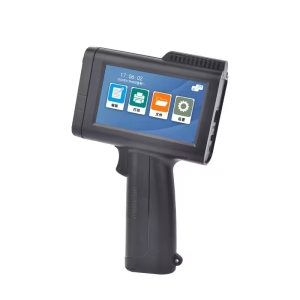
Handheld printing guns (also called garment printers, fabric printers, or portable textile printers) are innovative tools for creating custom designs on clothing, bags, hats, and other fabrics. They offer flexibility for small businesses, hobbyists, and even large-scale production. This guide covers everything you need to know to choose the right handheld printing gun.
Table of Contents
Toggle1. Understanding Handheld Printing Guns
What Is a Handheld Printing Gun?
A handheld printing gun is a portable device that transfers designs onto fabric using inkjet, thermal transfer, or direct-to-garment (DTG) technology. Unlike traditional screen printing, it requires minimal setup and is ideal for on-demand printing.
Types of Handheld Printers
- Inkjet Printers: Use liquid ink cartridges for vibrant colors. Best for light fabrics.
- Thermal Transfer Printers: Apply heat to transfer designs from special paper to fabric. Ideal for polyester blends.
- DTG (Direct-to-Garment) Printers: Print directly onto fabric using specialized inks. Suitable for cotton and mixed materials.
- Sublimation Printers: Use heat to infuse dye into synthetic fabrics.
2. Key Factors to Consider
Purpose and Volume
- Small-scale/personal use: Opt for compact, affordable models (e.g., MUNBYN Handheld Printer).
- Business/production: Prioritize speed, durability, and ink efficiency (e.g., Roland VersaStudio BN-20).
Print Quality
- Resolution: Measured in DPI (dots per inch). Aim for 300–600 DPI for sharp details.
- Color Accuracy: Look for CMYK+ compatibility (cyan, magenta, yellow, black + white or specialty inks).
Ink Compatibility
- Pigment Inks: Water-resistant and durable on cotton.
- Sublimation Inks: For polyester and synthetic fabrics.
- Eco-Solvent Inks: Odorless and suitable for diverse materials.
Fabric Compatibility
Ensure the printer works with your target fabrics (cotton, polyester, denim, etc.). Some devices struggle with dark fabrics unless they support white ink.
Ease of Use
- Portability: Weight, battery life, and ergonomic design.
- Software: User-friendly interfaces (e.g., Wi-Fi/Bluetooth connectivity, mobile apps).
- Maintenance: Self-cleaning nozzles and easy ink replacement.
Cost
- Initial Investment: Prices range from 200(budget)∗∗to∗∗200(budget)∗∗to∗∗10,000+ (industrial).
- Ongoing Costs: Ink cartridges, transfer paper, and replacement parts.
3. Top Brands and Models
| Brand | Model | Type | Price Range | Best For |
|---|---|---|---|---|
| Brother | PocketJet PJ-773 | Thermal Transfer | 500–500–800 | Small businesses |
| Epson | SureColor SC-F100 | DTG | 3,000–3,000–5,000 | Mid-range production |
| Roland | VersaStudio BN-20 | Inkjet | $10,000+ | Professional use |
| MUNBYN | IT3-Plus | Handheld Inkjet | 200–200–400 | Hobbyists/DIY projects |
| DNP | DS620A | Sublimation | 1,500–1,500–2,500 | Sportswear/polyester |
4. Where to Buy
Authorized Retailers
- Buy from brand-authorized dealers for warranties and support (e.g., Epson Store, Roland DG).
Online Marketplaces
- Amazon: Offers buyer protection and reviews.
- Alibaba: Bulk orders at wholesale prices.
- eBay: Refurbished/second-hand options.
Specialty Stores
- Stores like TeeShirtPalace or HeatPressNation cater to garment printing needs.
5. Pre-Purchase Checklist
- Read Reviews: Check YouTube demos and forums (e.g., T-Shirt Forums).
- Compare Features: Use comparison tools on retailer websites.
- Test Prints: If possible, request a sample print.
- Warranty: Ensure at least 1 year of coverage.
6. Post-Purchase Tips
- Calibration: Follow the manual to adjust color settings.
- Maintenance: Clean nozzles regularly to prevent clogs.
- Training: Watch tutorials or attend workshops for advanced techniques.
7. Safety and Compliance
- Use non-toxic, OEKO-TEX certified inks for skin-safe designs.
- Check local regulations for chemical disposal (e.g., solvent inks).
FAQ
Q: Can I print on dark fabrics?
A: Only with printers that support white ink underlayers (e.g., Epson SureColor F2100).
Q: How long do ink cartridges last?
A: Varies by model—budget printers may use $20 cartridges for ~50 prints.
Q: Is a heat press required?
A: For sublimation/thermal transfers, yes. DTG printers often don’t need one.
Final Thoughts
Handheld printing guns democratize custom apparel creation. Prioritize your budget, fabric needs, and volume to find the perfect match. Start with a mid-range model like the Brother PJ-773 to test the waters before scaling up.
By following this guide, you’ll confidently navigate the market and invest in a tool that brings your creative visions to life. Happy printing! 🎨👕